

CodeWalkthrough: Serving Machine Learning Predictions using gRPC in Python
A tiny demo on using gRPC as a way to serve ML predictions

Introduction
This is a code walkthrough on a little demo I created to showcase the use of gRPC as a means to serve out ML predictions.
The demo consists of a gRPC server and a small browser-based frontend which will interact with the gRPC server. The key feature of this demo is video object detection which showcases the bi-directional communication feature of gRPC.
Code repository here.
Why gRPC?
gRPC is a highly scalable Remote Procedure Call (RPC) framework invented at Google which uses Protocol Buffers (Protobuf) for data serialization.
For this demo, the key benefit of using gRPC is that of bi-directional streaming. With a single request, multiple samples (or batches of samples) can be sent from the client and the predictions also received from the server in a stream.
This means that there is no need to make multiple requests or pagination like in the case of REST.
There are other benefits such as integrated authentication, smaller message size due to the use of protobufs (in some cases), etc.. See gRPC documentation for more information. But in this demo, bidirectional streaming is the most important feature.
Of course there are also some shortcomings. See here.
Specifications
Gradio is used to construct the frontend of this demo.
The ML model used is YOLOv5, which is easily accessible via Torch Hub. In this case, I chose a lightweight model that can run quickly since the focus of the demo is gRPC and not the model itself. You can swap the model out for something more performant if needed.
Walkthrough
I won’t be going through every line of code or every step of the setup. I recommend that you clone/download the code repository and follow along. Installation and usage instructions are already in the README.
Don’t worry, I will be placing links to the exact code lines so that you don’t have to spend time navigating the repository too much.
1. Creating Protobufs
The entire gRPC service is defined using protobufs. Kind of like how OpenAPI specifications are used to defined REST APIs.
The gRPC service is defined as show below:
service MlPredictions {

    rpc PredictSingleImage(Image) returns (PredictionCollection) {}

    rpc PredictMultipleImages(stream Image) returns (stream PredictionCollection) {}

}
It consists of only two endpoints. The first endpoint is a simple image object detection service, PredictSingleImage. It takes an Image protobuf and returns a PredictionCollection protobuf.
The second endpoint, PredictMultipleImages, is the interesting one. It takes a stream of images and returns a stream of predictions, as denoted by the stream keyword.
2. Generating boilerplate code
With the protobuf file in hand, we can now generate the boilerplate code that will define the service using the grpcio-tools library.
This is done by running the command below.
python -m grpc_tools.protoc -Isrc/python_grpc_ml_demo \
    --python_out=src/python_grpc_ml_demo \
    --pyi_out=src/python_grpc_ml_demo \
    --grpc_python_out=src/python_grpc_ml_demo \
    src/python_grpc_ml_demo/lib/ml_predictions.proto
This creates the following three files:
ml_predictions_pb2.pyml_predictions_pb2.pyiThis file contains the classes of data objects in your service
In our case, the
Image,PredictionandPredictionCollectionobjects.
ml_predictions_pb2_grpc.pyThis is where the base classes for the server and client exist
We will then inherit these classes to create our bespoke client and server classes that contain the business logic
The thing I like about this code generation, on top of the fact that it saves me a tonne of time from writing boilerplate, is that the generated code exist as abstract classes to be inherited, instead of actual classes to be used.
This allows me to write my actual classes outside so that my business logic is not overwritten each time I regenerate the boilerplate due to changes in my protobuf (adding service, changing data model, etc.).
3. Creating server code
I will focus on the bi-directional streaming part of the server code as the single image prediction is pretty straightforward.
The key part to note is here.
    def PredictMultipleImages(self, request_iterator, context):

        logger.info("Predicting multiple frames/images...")

        for req in request_iterator:

            logger.info(f"[RECEIVED FROM STREAM] frame {req.frame}")

            yield self.__predict_one(req)

        logger.info("End of predictions.")
Note that this service takes an iterator. In Python, this could be a generator and that means that not all the data needs to be loaded into memory. It also means that data could come asynchronously. Note that there is a timeout feature that can be used to prevent connection hogging.
As the data samples are recieved, it will yield the results. Not return. This means that the results are also given back via a generator. Thus completing the bi-directional communication.
In this case, I have yielded the results back immediately after each prediction. But custom logic such as yield every n samples can easily be achieved if say a sequence of data points is needed as input.
4. Creating client code
The frontend is a Gradio app with a tab interface. One for image predictions and another for video predictions. In both cases, you upload an image/video from your computer for processing.
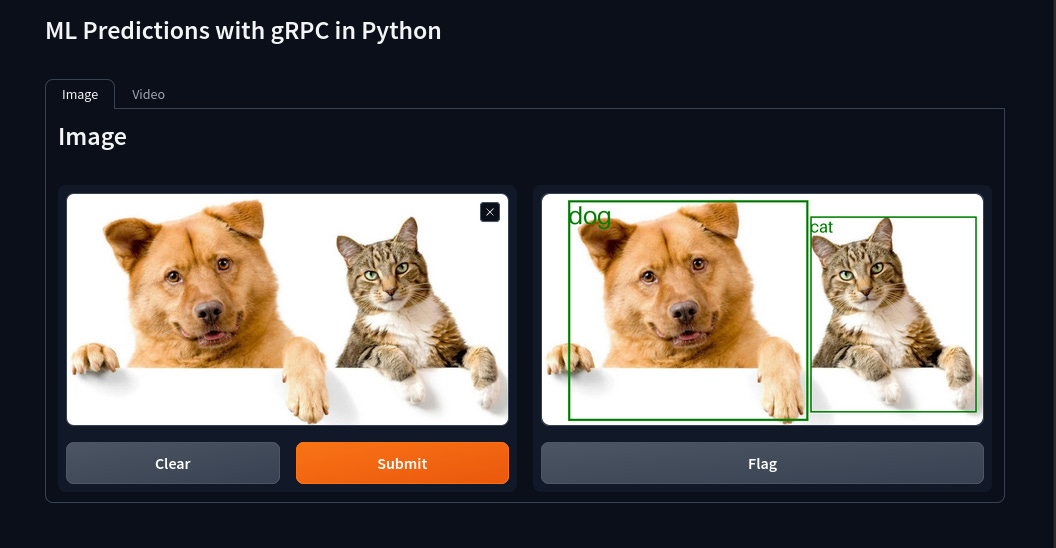
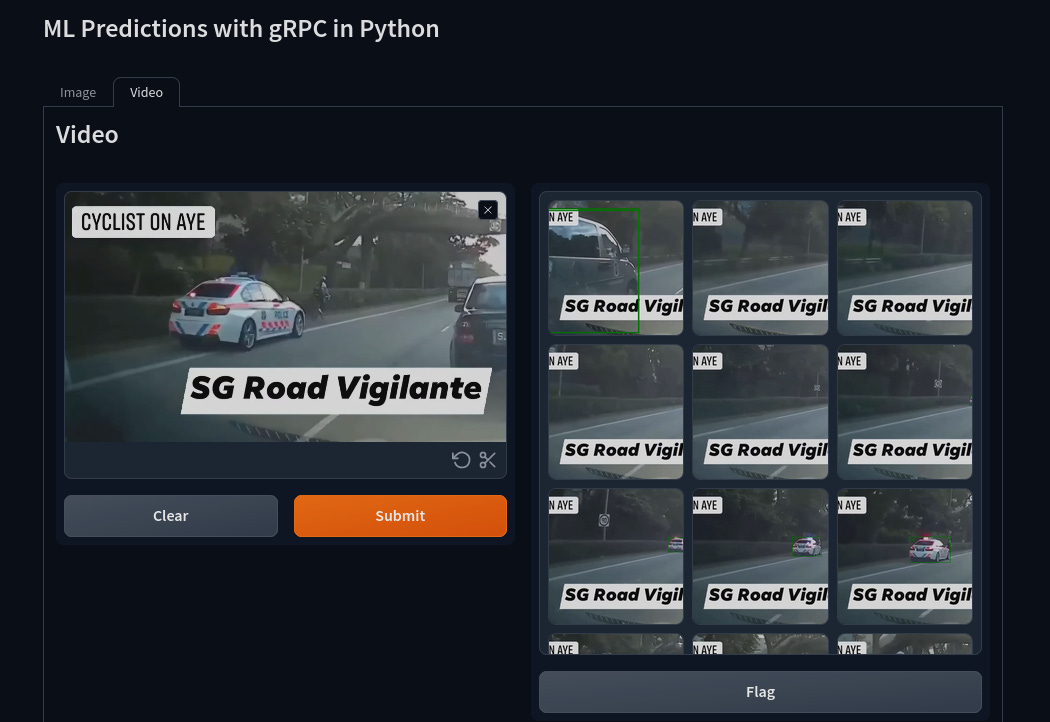
Both frontend interfaces are implemented via the ImageModule and VideoModule classses as can be seen below.
def run(stub):

    IM = ImageModule(stub)
    VM = VideoModule(stub)

    image_interface = IM.interface()
    video_interface = VM.interface()

    demo = gr.TabbedInterface(
        [image_interface, video_interface], ["Image", "Video"], title="ML Predictions with gRPC in Python"
    )

    demo.launch(inbrowser=True, debug=True)
Focussing again on the video object detection service, we can see in the main function generating the prediction that a generator of video frames is first instantiated as vid_frame_stream, which is then passed to PredictMultipleImages in line 121 of the modules.py file.
The response from the gRPC service, resp, is itself an iterator which is iterated over and additional custom logic is applied to the results (see here).
5. Running the demo
To run the server, type:
python src/python_grpc_ml_demo/server.pyTo run the client, type:
python src/python_grpc_ml_demo/client.pyTo see the effects of bi-drectional streaming, observe the logs from the server and clients.
You should see something like the follow…
Server logs
INFO:__main__:Predicting multiple frames/images...
INFO:__main__:[RECEIVED FROM STREAM] frame 24
INFO:__main__:[RECEIVED FROM STREAM] frame 48
INFO:__main__:[RECEIVED FROM STREAM] frame 72
INFO:__main__:[RECEIVED FROM STREAM] frame 96
INFO:__main__:[RECEIVED FROM STREAM] frame 120
INFO:__main__:[RECEIVED FROM STREAM] frame 144

...

INFO:__main__:[RECEIVED FROM STREAM] frame 1320
INFO:__main__:[RECEIVED FROM STREAM] frame 1344
INFO:__main__:[RECEIVED FROM STREAM] frame 1368
INFO:__main__:End of predictions.
Client logs
INFO:root:[RESULTS RECEIVED]... frame 24
INFO:root:[RESULTS RECEIVED]... frame 48
INFO:root:[RESULTS RECEIVED]... frame 72
INFO:root:[RESULTS RECEIVED]... frame 96
INFO:root:[RESULTS RECEIVED]... frame 120
INFO:root:[RESULTS RECEIVED]... frame 144

...

INFO:root:[RESULTS RECEIVED]... frame 1320
INFO:root:[RESULTS RECEIVED]... frame 1344
INFO:root:[RESULTS RECEIVED]... frame 1368
Conclusion
gRPC can be a scalable and viable way to serve out ML predictions. Especially in the case where the predictions are served out within an organisation’s own infrastructure and not direcly on user browsers (due to the use of HTTP/2 by gRPC).
It was a fun little demo to do. I hope it helps!